
Core concepts
Security
All API requests must use HTTPS with token-based authentication. Access tokens are required for API versions 3.0 and above.
Authentication Overview
The HLC API employs token-based authentication to secure all endpoints. Tokens are generated through the HLC web store and provide granular access control, enabling organizations to manage API credentials independently.
Security Notice
Adhere to industry-standard security practices. Never expose tokens in public repositories, client-side code, or share credentials with unauthorized parties.
Token Management
Accessing Token Management
Access tokens are managed through the HLC web store:
- Navigate to www.hlc.bike and authenticate
- Access My Account → User Settings
- Expand the desired user profile
- Select the External Services tab
Administrator Access Required
The External Services tab must be enabled by a site administrator. Contact your organization's administrator if this tab is not visible.
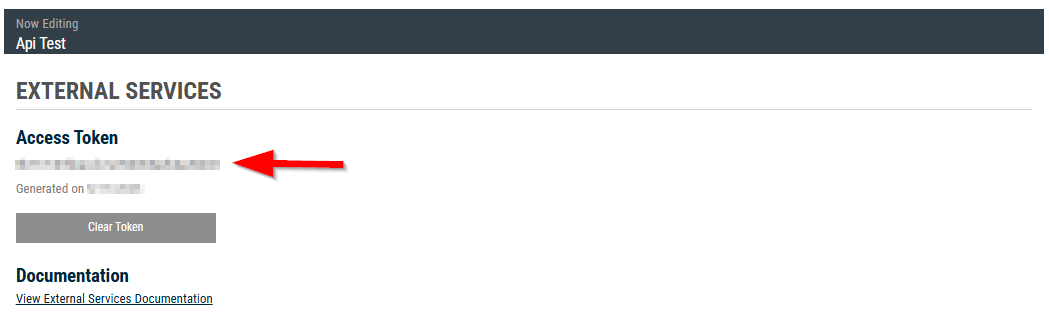
Token Operations
Generating a Token
- Navigate to the External Services tab as described above
- Click Generate Token
- Securely store the generated token - it will not be displayed again
Revoking a Token
To invalidate an existing token:
- Navigate to the External Services tab
- Click Clear Token
Token Revocation
Revoked tokens are immediately invalidated. Any applications using the revoked token will receive authentication errors until updated with a new token.
Rotating a Token
To rotate credentials:
- Click Clear Token to revoke the existing token
- Click Generate Token to create a new token
- Update all applications with the new token before the old token expires
Using Access Tokens
All API endpoints require token-based authentication via HTTP headers. The token authenticates and authorizes the caller for each request.
API Version 3.0+
For API v3.0 and above, include the access token in the Authorization header:
const baseUrl = 'https://api.hlc.bike/us/v3.0'
const apiKey = process.env.HLC_API_KEY

const response = await fetch(`${baseUrl}/Catalog/Brands`, {
  headers: {
    Authorization: `ApiKey ${apiKey}`,
    language: 'en',
    callerName: 'dealer-portal',
  },
})

if (!response.ok) {
  throw new Error(`HTTP ${response.status}: ${response.statusText}`)
}

const brands = await response.json()
Security Best Practices
Security Best Practices
- Secure Storage: Store tokens in secure credential management systems (e.g., AWS Secrets Manager, Azure Key Vault, HashiCorp Vault). Never commit tokens to version control or embed in client-side code.
- Environment Variables: Use environment-specific configuration files (
.env) excluded from version control via.gitignore. - Token Rotation: Implement periodic token rotation (recommended: every 90 days) to minimize exposure risk.
- Transport Security: Enforce HTTPS/TLS 1.2+ for all API communications. Reject unencrypted HTTP connections.
- Access Control: Implement role-based access control (RBAC) for token management. Audit token access regularly.
Troubleshooting
Authentication Errors
401 Unauthorized
Indicates authentication failure. Verify the following:
- Token validity: Confirm the token has not been revoked or regenerated
- Header configuration: Ensure the
Authorizationheader is present and correctly formatted (for example:Authorization: ApiKey <token>) - Token encoding: Verify no whitespace or encoding issues in the token string
- API version compatibility: Confirm token is valid for the target API version
403 Forbidden
Indicates insufficient permissions. Troubleshooting steps:
- Verify account has appropriate resource permissions
- Confirm the External Services tab is enabled for your user account
- Check organizational access policies and role assignments
- Review audit logs for permission-related errors
Connection Errors
If unable to establish a connection:
- Protocol verification: Ensure requests use HTTPS (TLS 1.2+), not HTTP
- Endpoint validation: Confirm the base URL matches your regional deployment (US/CA)
- Network configuration: Verify firewall rules and proxy settings allow outbound HTTPS
- DNS resolution: Confirm
api.hlc.bikeresolves correctly